SEO Title Checker (Title only)
0 / 100
Overall scoreDesktop Preview
Example Title – Your Website
www.example.com/page
Mobile Preview
Example Title – Your Website
www.example.com/page
0 / 100
A meta title checker saves you from one of the most common on-page SEO mistakes: publishing a title tag that gets cut off in Google search results. Type your title above and this tool instantly shows you the character count, pixel width, and a live SERP preview for both desktop and mobile.
Most SEOs focus on character count, but Google doesn’t work that way. It truncates titles based on pixel width, not characters. A title with 60 characters could still get cut if it’s packed with wide letters like W, M, or uppercase text. That’s why pixel width is the number that actually matters.
This tool gives you a real-time view of exactly how your title will appear in search results before you publish. No guesswork, no surprises after going live.
Paste your title in the box above and see your SERP preview instantly.
What Is a Meta Title and Why Does It Matter for SEO?
A meta title (also called a title tag) is the clickable headline that appears in Google search results. It tells both search engines and users what your page is about before they even click.
It’s one of the most important on-page SEO elements you can control. Google uses it as a strong relevance signal when deciding which pages to rank for a given search query. Get it wrong, and you hurt both your rankings and your click-through rate (CTR).
Your title tag also appears in three places:
- The browser tab when someone has your page open
- Search engine results pages (SERPs)
- When your page is shared on social media
A well-written, properly sized title can meaningfully improve how many people click your result, even without changing your ranking position.
What Is the Ideal Meta Title Length?
The commonly cited guideline is to keep your title tag under 60 characters. That’s a reasonable starting point, but it’s not the full picture.
Google measures title length in pixel width, not characters. The actual limit is around 600 pixels for desktop. A title that hits that pixel threshold gets truncated in the SERPs, regardless of how many characters it has.
Why does this happen? Different letters take up different amounts of horizontal space. A lowercase “i” is much narrower than an uppercase “W”. So two titles with identical character counts can behave very differently in search results.
The safest approach is to target both:
- Character count: 50 to 60 characters
- Pixel width: Under 600px for desktop, under 480px for mobile
Use the tool above to check both numbers in real time before you publish.
Why Does Google Truncate Your Title Tag?
Google truncates title tags because search results have a fixed display width. There is only so much horizontal space available, and anything that exceeds that limit gets cut off with an ellipsis (…).
The truncation happens at the pixel level, not at a fixed character count. This is why relying on character count alone gives you a false sense of security. You might be at 58 characters and still see your title cut in the SERPs.
A few things that push your pixel width higher than expected:
- All-caps words or brand names in uppercase
- Wide characters like W, M, and G
- Using a keyword-heavy phrase at the end of your title
Google also sometimes rewrites titles entirely if it thinks your tag doesn’t match the page content. Keeping your title accurate, concise, and within the pixel width limit reduces the chances of that happening.
How to Use This Meta Title Checker Tool
The tool is straightforward. Here’s how to get the most out of it:
- Type or paste your title into the input box at the top of the page
- Watch the live preview update instantly for both desktop and mobile SERP views
- Check the character count and pixel width displayed below the input field
- Adjust your title until both numbers fall within the recommended range
The overall score gives you a quick read on whether your title is in good shape. Aim for a high score before finalising any page title.
A good habit is to check every title before you publish, not after. It takes less than 30 seconds and can make a real difference to your CTR in search results.
If you manage multiple pages, run each title through separately to catch any that are too long, too short, or likely to get truncated by Google.
What Makes a Good Meta Title?
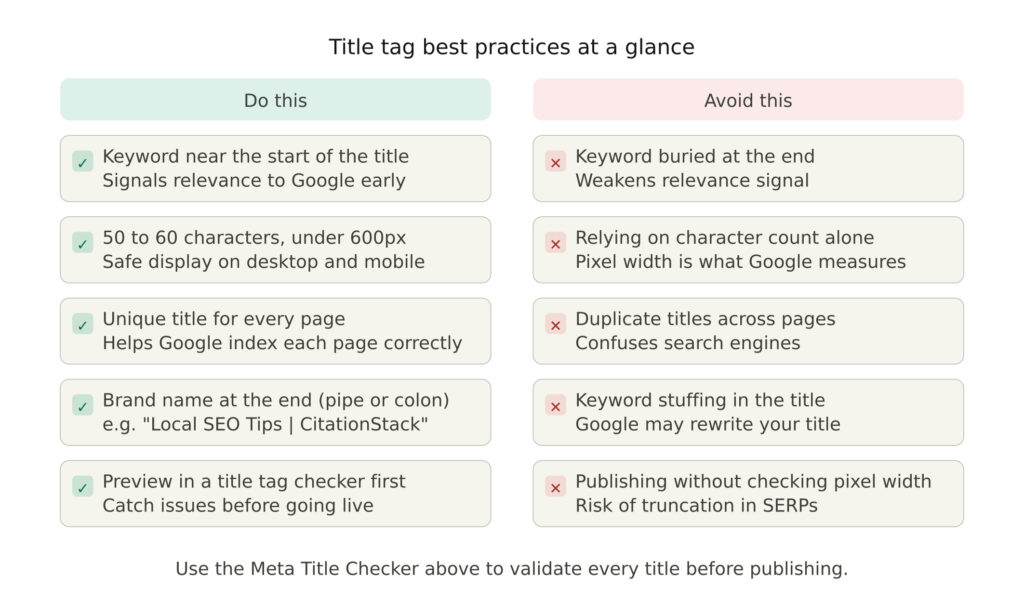
A strong title tag does two things at once: it tells Google what your page is about, and it convinces the user to click your result over everyone else’s.
Start with your primary keyword as close to the beginning of the title as possible. Google gives more weight to words that appear early, and users scanning search results tend to read left to right.
Keep the title specific to the page. A generic title like “Home” or “Services” gives Google nothing useful to work with and gives users no reason to click.
A few proven practices worth following:
- Include your target keyword naturally, without forcing it
- Add a benefit or differentiator where it fits (“Free Tool”, “2026 Guide”, “For Small Businesses”)
- Keep your brand name at the end, separated by a pipe or colon
- Avoid keyword stuffing, Google may rewrite your title if it looks manipulative
Every title should read like something a real person would want to click.
How Title Tags Affect Your Click-Through Rate in Search Results
Your title tag is essentially your headline ad in Google search results. It’s the first thing a user reads when your page appears, and it has a direct impact on whether they click or scroll past.
A higher CTR tells Google that users find your result relevant and compelling. Over time, that signal can positively influence your rankings. A poorly written or truncated title works against you on both fronts.
Truncation is a particular problem for CTR. When your title gets cut off mid-sentence, the user loses context and your message loses impact. Worse, a truncated title can make your page look unprofessional compared to a competitor whose title displays cleanly.
Small improvements to your title can produce noticeable CTR gains without any change to your ranking position. Testing a clearer, more benefit-driven title on an underperforming page is one of the quickest SEO wins available.
Use this SEO title checker to make sure every title you publish is fully visible and built to earn the click.
Common Title Tag Mistakes That Hurt Your SEO
Even experienced SEOs make title tag errors that quietly damage rankings and CTR. Here are the most common ones to watch for.
Writing titles that are too long. This is the most frequent mistake. Going over the pixel width limit means Google truncates your title in the SERPs, and your carefully chosen words never reach the user.
Writing titles that are too short. A title with fewer than 30 characters leaves ranking potential on the table. You have space to include a keyword and a clear value proposition, use it.
Duplicating title tags across multiple pages. Every page on your site should have a unique title that reflects its specific content. Duplicate titles confuse search engines and weaken your overall site structure.
Ignoring mobile truncation limits. Desktop and mobile have different pixel width thresholds. A title that displays perfectly on desktop can still get cut on mobile if it pushes past the tighter mobile limit.
Stuffing keywords unnaturally. Repeating your keyword two or three times in a single title does not help rankings. It looks spammy to users and Google may rewrite the title entirely.
Run every title through this title tag checker before publishing to catch these issues before they go live.
Frequently Asked Questions About Meta Title Checker
Google displays title tags up to approximately 600 pixels wide on desktop. In character terms, that usually falls between 50 and 60 characters, but pixel width is the reliable measure. Use this tool to check both before publishing.
Your meta title is the clickable headline shown in Google search results. Your H1 is the main heading displayed on the page itself. They can be similar, but they serve different purposes and do not need to be identical.
Google rewrites title tags when it thinks the original tag does not accurately represent the page content, is too long, stuffed with keywords, or too generic. Writing a clear, specific, and properly sized title reduces the chances of rewriting.
Yes. The title tag is one of the most important on-page SEO signals. Including your target keyword in the title helps Google understand your page’s relevance to a search query.
Different characters occupy different amounts of horizontal space on screen. Pixel width measures the actual display width of your title, making it a more accurate indicator of Google truncation than character count alone.
Yes, completely free. Paste your title in the box at the top of this page and get an instant SERP preview, character count, and pixel width reading with no sign-up required.